Moment 1 Free
Two batches of cookies?
Tap 2× and every amount doubles. Only have 200 g of butter? Tap the butter, type 200, and the rest of the recipe follows.


The baking recipe app for iPhone and Android
Change one amount and every ingredient follows. Bring in recipes from a link, a video, a caption or (on iPhone) a photo, then bake step by step with timers that ring.
Out now on Android, coming soon for iPhone.
Free to download. Plus and Pro are optional.
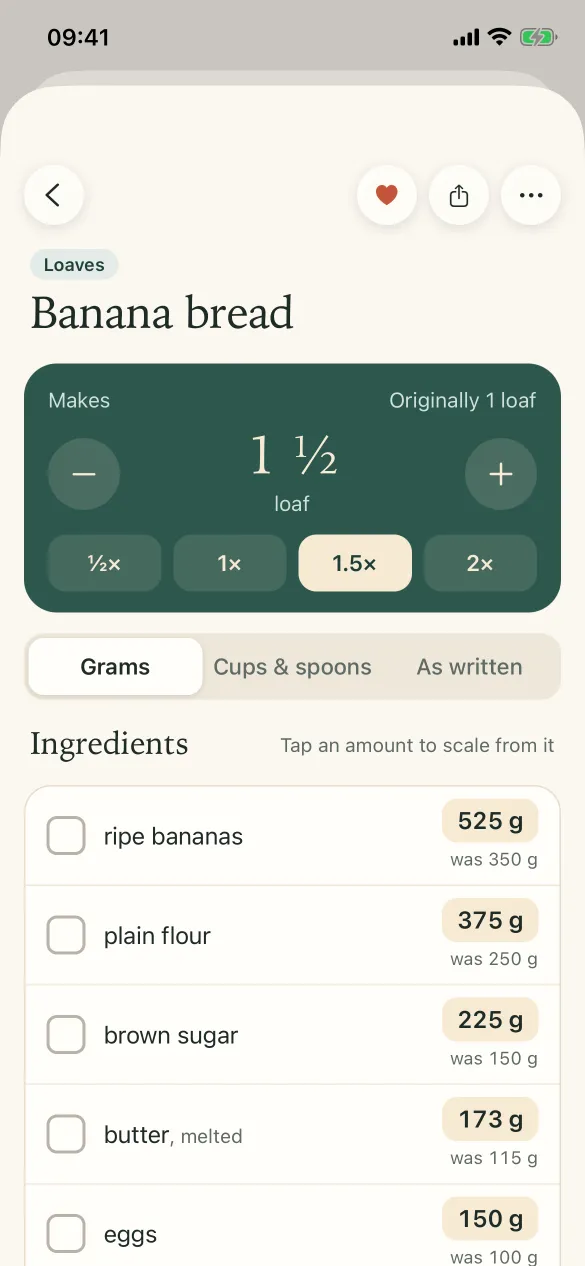
Tap 1.5×.Every amount follows, and shows what it was.
Sound familiar?
Home bakers follow recipes from everywhere: videos, captions, old notebooks. iDoughMath keeps them together and does the sums.
Moment 1 Free
Tap 2× and every amount doubles. Only have 200 g of butter? Tap the butter, type 200, and the rest of the recipe follows.
Moment 2 Free + Plus
Rewrite any step in your own words and add a reminder like “use baking paper”. With Plus, each step lists the ingredients it needs, at the size you are baking.


Moment 3 Free + Plus
Paste a recipe website, a YouTube video or an Instagram post. The recipe is read in, with a link back to the original and credit to the person who made it. With Plus, keep them in folders.


Moment 4 Free + Plus
Save decorating ideas from Pinterest or Google Images to your Decor Inspo board, with a note and a link back to the maker. Share a folder as one collage, with picture credits. Free keeps up to 3 groups; Plus has no limit.


Moment 5 Plus
Baking mode shows one step at a time, keeps the screen on and reads each step aloud. Start the step’s timer with one tap. Step timers work on every recipe: one at a time when free, several at once with Plus.

Moment 6 Free
Open the recipe’s shopping list, tick what you already have and send the rest to WhatsApp as a checklist.


How it works
These are real screens from the iPhone app.
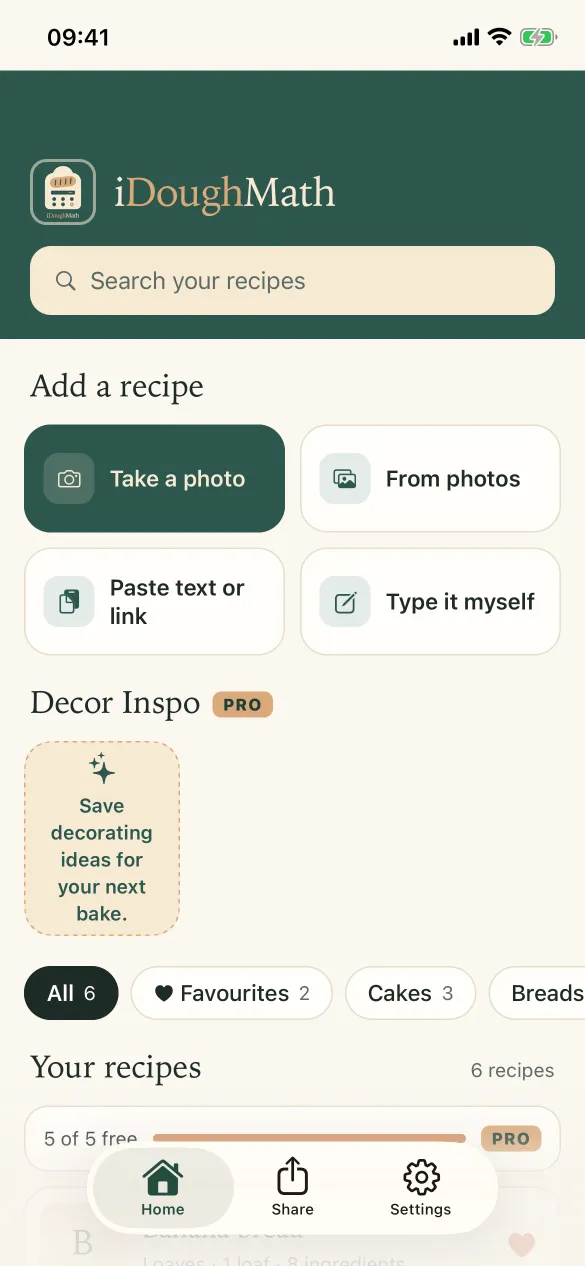
Paste a link or text, take a photo of a recipe, or type it in. Anything that can’t be read stays exactly as written.
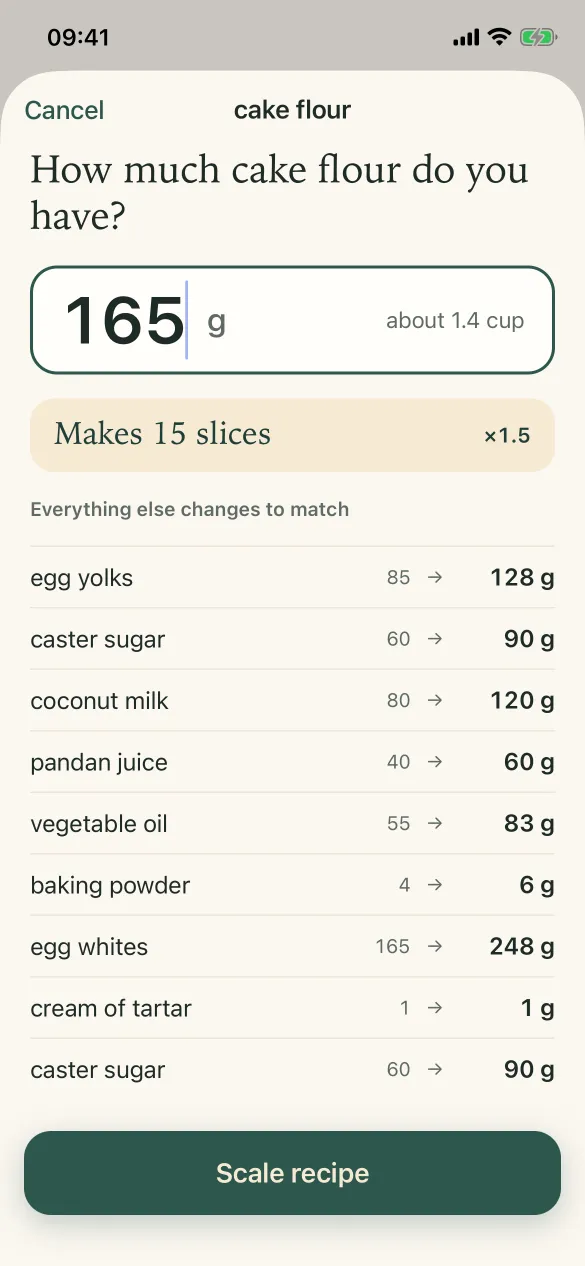
Tap ½× to 2×, change the servings, or tap any ingredient and type what you have. Everything else changes to match.
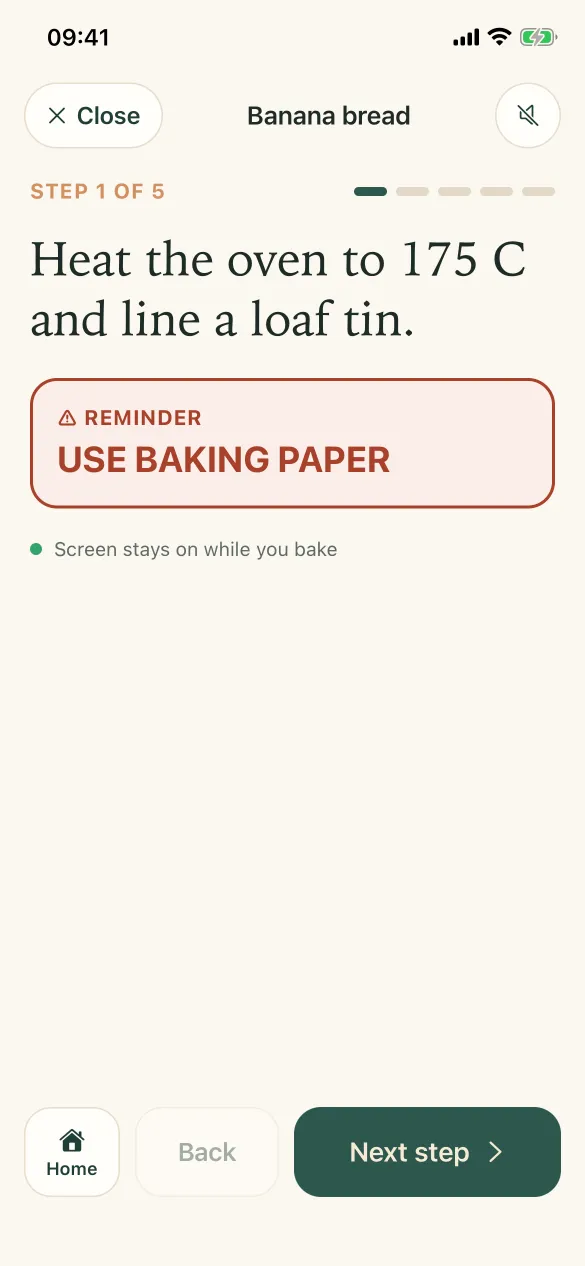
Follow each step with your own reminders. Times in a step become one-tap timers, and the alarm rings even when the app is closed.
Baking mode, shown here, is part of Plus.
Credit where it’s due
Behind every great recipe is a baker who tested it again and again. We have a lot of respect for them, so when you save a recipe from a website, a video or a post, iDoughMath keeps the original link and the creator’s name with it for good.
Everything in the app
Most of it is free. Features marked Plus come with iDoughMath Plus, and Pro adds tools for bakers who sell.
½×, 1.5×, 2×, a servings stepper, or type the amount you have of one ingredient. Every other amount follows and shows what it was.
Paste a recipe website, a YouTube video’s description or an Instagram caption, or paste plain text. The source link and its creator are kept with the recipe.
Photograph a cookbook page or a recipe card, or pick a photo. Apple’s text recognition reads it on your iPhone.
See a recipe in grams, in cups and spoons, or as written. Choose the cup it was written with: US 240 ml, metric 250 ml or Japanese 200 ml.
“Bake 30 to 35 minutes” becomes a timer with a check alarm and a done alarm. Free runs one timer at a time; Plus and Pro run several at once.
Edit any step and add reminders. With Plus, add photos and clips to steps, and see the ingredients each step uses.
One step at a time, screen kept on, each step read aloud with Apple’s voices on your iPhone.
Keep cakes, breads and cookies apart, heart the ones you bake most, and save as many recipes as you like.
A board for decorating ideas from Pinterest, Google Images or your photos, in groups (free keeps 3, Plus has no limit). Share a folder as a collage with picture credits.
Tick what you already have. The rest goes to WhatsApp, or anywhere else, as a checklist.
Send a full recipe as a PDF with your photos, or as text. Translate it as you share, on your iPhone. Amounts and temperatures never change.
Add what you pay for ingredients (by hand, or from a receipt photo on iPhone) and see what each bake costs, a selling price and your profit per piece, with packaging and other costs counted.
Order quotes, a pop-up market planner with a stall counter, preorders with invoices and a payment QR, menus you can share and a monthly profit report. See how
English, 繁體中文, 简体中文, 日本語, Português and Bahasa Melayu. Timers understand times written in all six.
For bakers who sell Pro
Taking orders, selling at pop-ups, sending menus? Pro adds a Business tab that turns your recipes and ingredient prices into quotes, stall sales, orders and a monthly profit, all on your phone.
Quote. Pick the recipe and see what each one really costs you. Add packaging, delivery and your time, and get a price with your profit shown before you reply.
Pop-up. Plan what to bring, with the stall fee and card fees counted. On the day, the stall counter adds each sale with a tap, takes cash or shows your payment QR, and tracks what’s left.
Orders. Every order on a calendar by pickup day: who has paid, who has picked up, what’s overdue. Send the invoice and your payment QR on WhatsApp, and keep photos of each order before it leaves.
Menus. Make a menu with photos, prices and answers to the questions customers always ask, then share it in one go instead of typing it out again.
Profit. See the month’s revenue, costs and profit across your orders and pop-ups together, compare two events side by side, and export a PDF or CSV for your records.
Supermarket trip. Photograph shelf prices as you shop, and your ingredient costs update, so every quote and profit figure stays right.
Pro includes everything in Plus, starting with the cost calculator: what each bake costs, its selling price and your profit per piece. See plans
Pricing
No ads in any plan. Every plan starts with a 7-day free trial.
$0
Free to download and keep.
Share any recipe as an invite to the app.
$1.99 / month
or $19.99 / year, about 16% less than monthly
7-day free trial, monthly or yearly
Renews automatically. Cancel any time in your Apple Account or Google Play settings.
$4.99 / month
or $49.99 / year, about 17% less than monthly
7-day free trial, monthly or yearly
Renews automatically. Cancel any time in your Apple Account or Google Play settings.
Prices are in US dollars; the App Store and Google Play show the price in your currency. Every plan starts with a 7-day free trial for new subscribers. Payment is charged to your Apple Account or Google Play account when you confirm the purchase, or when your free trial ends. The subscription renews automatically unless you cancel at least 24 hours before the end of the current period. Manage or cancel it in your iPhone’s Settings under your name, then Subscriptions, or on Android in the Google Play app under Payments and subscriptions. See the Terms of Use and Privacy Policy.
Questions
It’s out now on Android: get it free on Google Play. The iPhone app is coming soon to the App Store; if its page isn’t open yet, please check back shortly.
Yes. Scaling, unit conversion, adding recipes, step timers and the shopping list are free, with up to 5 saved recipes and 3 Decor Inspo groups. Plus ($1.99 a month or $19.99 a year) adds the cost calculator and unlimited recipes, and Pro ($4.99 a month or $49.99 a year) adds the Business tab and the Supermarket trip. Every plan starts with a 7-day free trial.
Recipe websites that publish their recipe in the standard recipe format most food sites use, the description of a YouTube video, the caption of a public Instagram post, text you paste, and photos of recipes. Any line it can’t read is kept exactly as written, so nothing is lost.
Grams are the main measure, and you can switch a recipe to cups and spoons or back to how it was written. Cups differ around the world, so you choose the cup a recipe uses: US 240 ml, metric 250 ml or Japanese 200 ml. If a recipe doesn’t say, the US cup is assumed, and you can change it in the recipe.
No. Everything works without one. If you sign in (email on both; Google or Apple on iPhone), your settings and saved recipes are backed up so they move with you to a new phone. Photos stay on your phone.
On your phone. If you sign in, a backup copy of the recipe text and your settings is kept in your account, which only you can read. Read the Privacy Policy for the details.
In the app, go to Settings, then Manage subscription. Or open your iPhone’s Settings, tap your name, then Subscriptions; on Android, open the Google Play app, then Payments and subscriptions. Cancel at least 24 hours before the renewal date to avoid the next charge.
Open Settings in the app and tap Restore purchase, using the same Apple Account or Google account you subscribed with.
No. Translation is on iPhone and uses Apple’s translation on your iPhone. The first time, your iPhone may download the language; after that it translates without the internet. It needs iOS 18 or later.
Bring in the recipes you love, bake them at any size, and enjoy the bit that matters.